
途域 PathRealm
智能队形和位置感知
一起出发,不必时刻走在一起。途域让你了解同伴的位置、队伍的变化,也让路上的消息传递得更自然。
徒步 · 跑步 · 自行车 · 摩托车 · 汽车
01 / 一起出发
从一起出发,到一路相伴
创建活动、邀请同伴,在同一场活动里查看位置、了解动态、交换消息。
- 01
建立活动
选择活动类型,设置昵称,创建属于这次出行的团队活动。
- 02
邀请同伴
分享邀请码,同伴可以输入、粘贴或扫描邀请码加入。
- 03
一起行动
打开位置共享,在地图上了解彼此的位置,用团队消息保持联系。
02 / 团队地图
队伍分散了,也能看清彼此
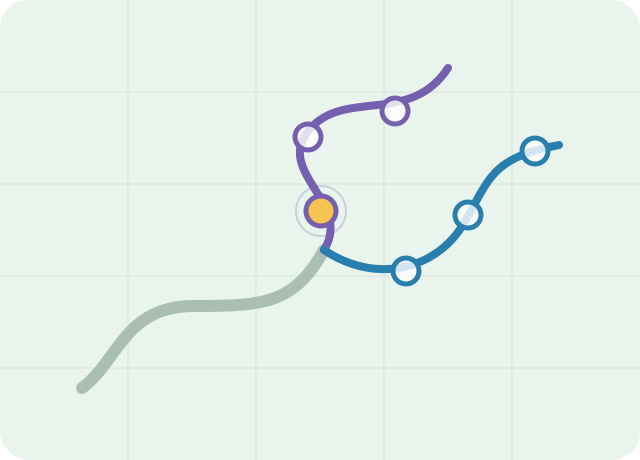
全屏地图展示共享位置的成员,选中成员可查看其轨迹。自己的位置用金黄色圆点表示,其他成员通过不同颜色的外圈区分所在的行进队列(Line)。
成员沿不同路线行进或重新汇合时,途域会根据运动信息更新队列关系,帮助你理解队伍分布。
位置与轨迹更新受网络、定位权限和设备状态影响,不能替代现场判断。
03 / 智能感知
队伍有变化,不只靠低头看
手动播报队伍动态,了解当前情况;开启智能感知后,途域还可以自动播报识别到的队伍变化。
与地图配合使用,在适合收听的时机获取团队信息。智能感知属于 Premium 功能,手动播报不依赖 Premium。
- 01成员位置与运动信息
- 02队伍状态变化识别
- 03智能感知语音播报
04 / 团队消息
路上的消息,留在团队里
给同伴发送团队文字消息,也可以在共享位置开启时附加自己的位置。保留未读提醒,方便稍后查看。
Premium 的“团队消息自动播放”可以朗读收到的文字消息,与智能感知独立开关。不想自动收听时,仍可正常收发文字消息。
05 / 自主设置
按你的习惯使用,按你的意愿共享
共享由你控制
活动中可以关闭“共享我的位置”;关闭后不能在团队消息中附加自己的位置。
语言与单位可选
分别选择界面语言、播报语言和距离单位,让查看与收听都更顺手。
离开与结束有区别
成员可以退出活动;组织者可以结束整场活动,让本次团队协作告一段落。
需要帮助,或者想了解更多?
PathRealm
Smart Team Location Awareness
Head out together, without having to stay side by side. See where your companions are, understand changes in the team, and keep the conversation moving.
Hiking · Running · Cycling · Motorcycling · Driving
01 / GET TOGETHER
From meeting up to moving together
Create an activity, invite your companions, and share positions, updates, and messages in one place.
- 01
Create an activity
Choose an activity type, set your nickname, and create a team activity for your outing.
- 02
Invite your companions
Share the invitation code. Others can type, paste, or scan it to join.
- 03
Head out together
Enable location sharing to see each other on the map and stay in touch with team messages.
02 / TEAM MAP
See the team, even when it spreads out
The full-screen map shows members sharing their locations. Select a member to view their track. Your marker stays gold, while colored rings distinguish groups moving together, called Lines.
As members take different routes or come back together, PathRealm uses movement information to update these groups within your activity.
Location and track updates depend on connectivity, permissions, and device conditions. Always use your own judgment.
03 / SMART AWARENESS
Hear what’s changing in the team
Request a team update when you need one. With Smart Awareness enabled, PathRealm can also automatically announce detected changes in the team.
Use audio alongside the map when it is safe to listen. Automatic Smart Awareness is a Premium feature; manual announcements do not require Premium.
- 01Member positions and movement
- 02Team changes detected
- 03Smart Awareness announcement
04 / TEAM MESSAGES
Keep the conversation with the team
Send text messages to your companions and attach your location when sharing is enabled. Unread indicators help you catch up later.
Premium Auto-Play Team Messages reads incoming text aloud. It has its own switch, separate from Smart Awareness. Text messaging remains available with auto-play off.
05 / YOUR CHOICES
Your preferences. Your choice to share.
Control location sharing
Turn off Share My Location during an activity. While it is off, you cannot attach your location to team messages.
Choose languages and units
Set the interface language, announcement language, and distance units separately to suit the way you use the App.
Leave or end an activity
Members can leave an activity. The organizer can end it for everyone when the outing is over.